Skip to content
Documentation
FAQSupport CenterContact
Documentation
Logging into the Yodeck Portal and creating an account
Overview of the Yodeck Portal Pushing Changes to Screens Help Icons
Creating a Yodeck Player based on Raspberry Pi 4 - Introduction Downloading and using Etcher Yodeck Raspberry Pi Compatibility Chart Raspberry Pi Comparison What is the Yodeck Player? Notes for the Raspberry Pi 4 Connect the Yodeck Player to a WiFi using your mobile phone by scanning a QR code
Creating a Yodeck Player based on Raspberry Pi 5 - Introduction Raspberry Pi 5 Limitations
Setting up a Yodeck Web Player Comparison Table RPi vs Web player Web Player Chrome Extension and PWA
Install Yodeck in Android with the Windows and Linux Setup Helpers Setting up an Android player with the Yodeck Software (via APK--Android 7 or earlier) Install Yodeck in Android with Setup Helper Setting Up Remote Device Management (RDM) on a Sony Bravia Professional Display with the Yodeck Android (APK) Setting Up Remote Device Management (RDM) on a Sharp ME Display with the Yodeck Android (APK)
Setting up an Android player with the Yodeck Software (from Play Store) Tested and Approved Android Devices Android Limitations
Create a Yodeck Android Player - Introduction
Amazon FireOS Limitations Setting up a Yodeck Amazon Signage Stick Player
Create a Yodeck Amazon Player - Introduction Setting up a Yodeck Amazon FireOS Player
Setting up a Brightsign player with the Yodeck Software Comparison Table Raspberry Pi vs Brightsign player Supported Brightsign Players
Samsung SSSP / Tizen Supported Devices Tizen Limitations Update the firmware version on your Samsung Tizen TV Setting up a Tizen player with the Yodeck Software
Setting up an LG webOS player with the Yodeck Software LG webOS Supported Devices LG webOS Limitations
Setting up a Windows player with the Yodeck Software Installation Guide of WMIC Utility for Windows 11 How to uninstall the Windows application Windows Supported Devices Set Up the Yodeck Windows Player
Setting up a Yodeck ChromeOS Player ChromeOS Limitations
Creating a Yodeck Player - Introduction
How to Set Up a Windows Media Player Connect your Android Phone to an Android Device/Player Plug Types Connect your Android phone to Android TV How to Set up a Samsung Tizen Player How to Set Up an LG WebOS Player How to Set Up a FireOS Player with Yodeck How to Set Up a BrightSign Media Player What is the Yodeck Web Player? How to Unzip the Yodeck image Setting Up a Yodeck ChromeOS Player How to Register a DIY Yodeck Player based on Raspberry Pi
Main Menu Overview Dashboard Overview The Dashboard
Supported File Extensions
Gallery Images Introduction
How to create a simple Video-wall with Yodeck How to setup an HDMI video feed input or connect a USB camera (Video Input) Recommended USB devices Videos Introduction
Scripting Engine Reference Scripting FAQ b;blaff Scripting Templates Tutorial - Google Analytics Tutorial - How to remove the cookie pop-up from your web page media Useful Scripts To Use Mask your credentials at the Scripting Engine text field
Hide Cookie Banner - Script Automation (BETA)  Webpage Recording Tool
Web Pages Introduction
Audio Assets Documents
Can I use PowerPoint slides with videos? Do you support Vimeo videos? Does Yodeck support authenticating on a web page? File size limitation on the Yodeck portal Hide Cookie Banner – Script Automation (BETA) How can I display an internal/local website on Yodeck? How to create a simple Video wall with Yodeck How to set a Web Page to refresh How to set up an HDMI video feed input or connect a USB camera (Video Input) How to Upload a Web Page with Yodeck How to Upload Audio File to Yodeck How to Upload Documents with Yodeck How to Upload Images with Yodeck How to Upload Videos with Yodeck Live Video Streaming Support Web Page - URL Parameters Per Device What is the maximum slide number that a ppt/pptx file can have? What Save options do I have? What types of audio files does Yodeck support? What types of documents does Yodeck support? What types of images does Yodeck support? What types of videos does Yodeck support? Why am I seeing the "Could Not Get Video from YouTube" on my screen? Why my images don't fit in the screen
Current Weather Daily Weather Hourly Weather Weather Radar Weather Wall
Analog Clock Counter Down Counter Up Date & Time Word Clock World Clock
Custom Keyboard Guide for Interactivity Interactive Kiosk - Introduction
World Football Feed 2026 Bonusly Custom Feed Daily Feed BambooHR Ticker Google Slides DSMenu TV Source Teams Celebrations Google Sheets WiFi Share Embed Player Basic Info Google Traffic Waze Birthday Notification PosterMyWall WikiQuotes QR Code Online Slideshow Rich Text
Al-Jazeera RSS Bloomberg News BBC RSS CBC RSS CNN RSS CTV News ESPN RSS Fox News Google Alerts Google News RSS NU.nl News RSS SharePoint News Sky News RSS The Guardian RSS The New York Times The Wall Street Journal Yahoo Custom RSS
Facebook Instagram LinkedIn Twitter Taggbox Display Microsoft Teams Town Hall Walls.io
Calendar Apps Introduction Google Calendar Outlook Calendar Daily/Weekly Calendar Monthly Calendar Calendar Events Feed
Power BI with Service Principal - Introduction Power BI with Service Principal - Identity Requirements
Salesforce Qlik Sense Power BI Google Looker Studio SmartSheet Airtable Tableau JWT Cyfe My Dashboard Asana Tableau Google Analytics Xero Fathom Shedul Trello Zoho Baremetrics Putler ChartMogul Chargebee Zenkit Grafana Display "ServiceNow" Data on Your Screens Using Yodeck’s Grafana App Monday.com Jira
Microsoft Planner Canva Microsoft Teams Rooms Notion Zoom Rooms Qube SharePoint Teams Channels Viva Engage
Interactive Kiosk Interactive Library
Custom Apps
Display Public IP (sample App) The Simple Clock Shedul (sample App) Trello (sample app) Current Weather Digital Clock (sample App) Monthly Calendar Calendar Events Feed Date&Time App Code Daily Weather App Source Code ChartMogul (sample app) Sample Web Widgets Sample HTML Widgets Tutorial - Your 1st Widget Baremetric (sample app) Hourly Weather App Source Code Google Calendar (Sample App) Count Down/Up Rich Text (Sample App) RSS Custom
Analog Clock (sample App) 4. Adding Transparency (Optional) 3. Making the Clock Efficient HTML App API HTML App Packaging Player HTTP API 2. Add Options to the Clock App 5. Zipping and Uploading the Custom Sample Clock
Static Apps Custom Apps Introduction UI Form Definition for Custom Apps Building a Web App
Embeddable Feeds Counting Embeddable Feeds' Views
Yodeck Assurance
App Compatibility Table Apps Introduction Available Apps! ScreenFeed Apps in Yodeck
Embeddable Feeds Get your Google Calendar on a wall-mounted TV screen Get your Google Docs on a wall-mounted screen Get your Google Sheets on a wall-mounted screen How do I display a Canva Design on my screen? How do I display a Grafana dashboard on my screen? How do I display a Tableau dashboard on my screen? How do I display my employees' birthdays on my screen? How do I display my Instagram profile on my screen? How do I display the Word Clock? Instagram Basic Display API Discontinuation: How to Keep Your App Working Multi-language Ticker (Japanese, Korean, Chinese) Microsoft Apps Limitations How do I display my Facebook personal feed on my screen? How do I display my local weather on my screen? How do I display my calendar on my screen? How do I display a Power BI dashboard on my screen? How do I display SharePoint on my screens? Display Custom RSS feed or any other RSS feed How to Get the ICS Link of a Google Calendar and Import It into Yodeck How to Display Your iCloud Calendar on a Yodeck Screen Microsoft Azure Portal - Manage consent and permissions Troubleshooting Google and Microsoft Sign-In Issues Tableau JWT connected App
Media Availability
Dropbox Playlist Introduction Dropbox - OneDrive - SharePoint - Google Drive - Google Photos Supported Media Formats
Sub-Playlists Dropbox Playlist How to Create a Playlist with Yodeck How do I display OneDrive content on my screen? How do I sync different regions in a Layout? Tag-Based Playlist How do I display Dropbox content on my screen? Do you provide Transition effects? How to Create a Playlist Playlist of Layouts OneDrive Playlist Interactive Playlist How do I sync different regions in a Layout?
Playlists Introduction Managing Playlists with Folder View ON Interactive Playlist Playlist of Layouts Tag-Based Playlist [Premium & Enterprise Plans only] Sub-Playlists [Premium & Enterprise Plans only] Import CSV [Premium & Enterprise Plans only] Google Drive Playlist OneDrive Playlist SharePoint Playlist
How to create a Custom Ratio How do I add background audio? Lockable Layouts How to Create a Layout How can I add a layout inside a playlist?
Getting Started with the Yodeck Layout Editor Using Templates in the Layout Editor Editing and Customizing Content in the Layout Editor Working with Screen Sizes and Aspect Ratios in the Layout Editor Locking Elements and Controlling Access in the Layout Editor Branded Templates: Create and Manage Reusable Layout Designs Advanced Settings and Scheduling Layouts in the Layout Editor
How to Create a Schedule with Yodeck Schedule Content and Default with example Schedule content, example of display media on a specific time frame and the rest hours to turn the screen on How do I set when things get displayed? How can I schedule what gets shown?
Schedules Introduction Examples of Schedules Turned Off option - How to Turn your TV On and Off Scheduled Availability
Prioritization of Content Types
Support for LED board screens and billboards Sound/Display Introduction
Configuring your player's WiFi network by editing the SETTINGS.TXT file Configuring your WiFi network using an Ethernet cable Quickly connect your Yodeck player to your WiFi network by using the WiFi wizard Wireless Introduction
Advanced Configuration for 3G / 4G / LTE modems 3G/4G/LTE Introduction
Network Introduction Proxy Static IPs Keeping Your Players on Time by Configuring an NTP Server
How to Register a Screen in Yodeck Yodeck Registration Code Screen Email Notifications
Screens Overview Introduction Location Status Media Filtering Working Hours Screen Takeover Screens Table Manual Basic Info
How to quickly assign content to your Screens
Monitoring Screen Status
Custom arguments/policies for Chromium Customization Introduction How to add custom proxy settings per Web Page using the Advanced Player Directives
Security Introduction Custom Certificates Encrypt Player Storage [Enterprise Plan only] Lock Down Player [Enterprise Plan only]
Advanced Screen Options Introduction On-screen Messages Timed Events
GPIO Demo App: ON/OFF Trigger Example GPIO HTTP API GPIO Technical Documentation Introduction to GPIO-Triggered Signage with Yodeck
Interactivity Introduction
Can I use the Composite output instead of the HDMI? Changing the screen resolution on a Yodeck Player Custom Script for TV Power On/Off Do the Yodeck players support touch screens? Do you support Android devices? Does the Yodeck player support connecting through an HTTP Proxy? Does the Yodeck player support static IP? Does Yodeck Player support connecting through a WiFi network? Does Yodeck support a web-based player? Does Yodeck support dual screens/monitors using the two HDMI ports on the Player? Downloads How can I export my screen details? How to change the hostname for your Yodeck Player How to change the keyboard layout for Yodeck players How to create content for your Yodeck Screens - A comprehensive guide How to enforce the virtual keyboard on Yodeck players How to Reduce Your Screen Brightness with Layouts and Schedules in Yodeck Install Yodeck on NEC Compute Model by using an external OS host Install Yodeck on NEC Compute Module by using Yodeck bootloader List of compatible 3G/4G USB dongles for the Yodeck player List of compatible USB WiFi antennas for the Yodeck player Remotely access your Yodeck player by using SSH Scan for available WiFi Warning Icons on the Yodeck Player What are the available plug types for the Yodeck Player? What does the "Preparing Content" message mean? What is the "Device Disabled" error message? What is the "Internet Access Required" or the Invalid Schedule File" error message? What is the "No Content Assigned to Player" error message? What is the "Player Already Registered" error message? What is the true voltage operating range for a Yodeck Player (Raspberry Pi 4) Why does my screen show the message "No Space Left"? Why is my Player running in VGA resolution (640x480 or 1024x768)? Yodeck Players and Captive Portals Comprehensive Tech Guide for Installing and Setting Up Yodeck/Unbranded App on Windows via ZIP file How can I set up my Yodeck devices/players? How to Flash an SD Card with Raspberry Pi Imager for Yodeck How to reflash your Yodeck player
Users Custom Roles Groups
Default Emergency Alert Types Common Alerting Protocol (CAP) Integration National Weather Service Alerts Emergency Alerts Introduction
How to configure SCIM with OneLogin
How to configure SCIM with OKTA
How to configure SCIM with Azure directory (EntraID)
How to configure SSO with Salesforce Introduction to Single Sign-on (SAML 2.0) How to configure SSO with ADFS How to configure SSO with Azure Active Directory (Microsoft Entra) How to configure SSO with G Suite
Account settings Introduction Playback Reports Custom Fonts Volume Schedules Security Policies Audit Log Players Boot Logo
Workspaces Introduction Organize Yodeck Workspaces Roll Out Workspaces at Scale Workspaces Troubleshooting Workspace Hierarchies
Supported Languages for the Yodeck account How to change the account ownership to another user Groups & User Roles Updates on April's 2023 Release How to find your 2FA Security Key Subscription Plans within the account How can I add more screens to my Subscription? Can I pay via PO/Invoice/Direct deposit/Wire transfer? Do you save my credit card details? Can I have an annual plan on Yodeck? How can I configure Workspaces within my account? How can I change my subscription screen capacity or Plan? Transfer Your Free Account to Your Company’s Paid Yodeck Plan Do you ship globally? How can I cancel my Yodeck subscription? Getting the VAT Number on Invoices What user roles do you provide?
Yodeck Unlimited Access Period Subscriptions & Billing My User Profile Canceling Your Subscription and Deleting Your Account Billing Entities: Bill Multiple Organizations Under One Yodeck Account
Help Menu Overview
Issues with Logging into Yodeck Portal Step-by-Step Troubleshooting Guide
Bypassing Video Re-encoding (As-Is Upload) Can I have root/SSH access to the Yodeck Player? Can I use an HDMI-to-VGA adapter for VGA monitors? Configure RTC DS3231 Do I have access to my account if SSO authenticator is down? Do you have an on-premise solution? Do you support Google Chromecast? Do you support LG webOS Players? Do you support Samsung Tizen Players? Does the Yodeck player support Power over Ethernet (PoE)? Does the Yodeck software image work on the Pi 400? Does Yodeck support connecting through an HTTP Proxy? File size limitation on the Yodeck portal How Content Transitions Work How do I add background audio? How do I change the account ownership to another user? How do I change the TV's HDMI source? How do you factory reset the Yodeck device/player? How does Yodeck support powering monitors and TVs on and off? How much bandwidth does Yodeck use? How secure is Yodeck? How to configure the Yodeck player with an Argon ONE case How to reflash your Yodeck player How to Turn your TV On and Off I have a restricted network. Which ports do I need to whitelist for the Yodeck players? Introducing Yodeck's REST API: Seamless Integration for Your Digital Signage Needs Introducing Yodeck's REST API: Seamless Integration for Your Digital Signage Needs Is there a bandwidth limit for media uploaded or downloaded on Yodeck? Reset all Settings on your Yodeck Player Software support for Raspberry Pi 5 What about Internet outages? What will happen to my players? What are the supported browsers for the Yodeck Portal? What are the Yodeck Player specs? Which OS are the Yodeck Players (Raspberry Pi4) are running? Which Raspberry Pi does Yodeck support? Yodeck Manual Configuration Guide for Raspberry Pi
Are there any limits placed on Yodeck usage? Can I use Yodeck for my customers without being a Reseller? Do you provide SSO(SAML) authentication? Do you provide TV sets or installation services? Do you support an 8K resolution? Do you support emergency alerts? Do you support LED board screens and billboards? Do you support non-profit organizations (NPOs)? Do your players support portrait mode? Does Yodeck support monitors mounted vertically? Does Yodeck support monitors of all sizes? Does Yodeck support outdoor LED billboards? Does Yodeck work offline? How can I enable 2FA on my account? How can I schedule a demo call? How can I test-drive Yodeck without buying a Yodeck Player or Raspberry Pi? How can I upload a custom font? How Do I Choose Between the 1GB and 4GB Yodeck Players, and How Do I Upgrade? How do I create a digital signage player? How do I preview what's displayed on the TV before pushing the content? How is Yodeck priced? How many screens does Yodeck support per account? How to display Euro 2024 stats on your TV screen How to make your Yodeck account secure How to quickly assign content to your Yodeck Player How to use the Takeover Feature How will I get charged for my service renewal? I accidentally deleted my screen. Do you know what I can do? I bought the players from you. How do I pre-configure them with WiFi credentials? If I purchase a Yodeck player and try the service but decide it’s not for me, can I return the player for a full refund? If so, how long do I have to make the return? Is the Yodeck service manageable through a mobile phone? Do you provide an app? Multicurrency My organization is tax-exempt. How do I get my tax exemption form? Pricing Plans & Screens Volume Discounts What about Customer Support? What does Yodeck allow me to show on my screens? What happens if a charge for my subscription fails? What happens if I want to reduce my active screens/players? What if Yodeck Player fails? What TVs or monitors does Yodeck support? What type of Service Level Agreement (SLA) do you provide? What will happen if I cancel my subscription? When will my players be shipped? When will my Yodeck player be here? Why do I lose my 1st Free screen when I upgrade my subscription? Why do Yodeck Players download everything locally? Why use Yodeck and not my TV's USB media player feature or my Smart TV? Yodeck Pricing Update 2026 Υodeck Community Usage Policy (Terms of Use) What are the requirements for using Yodeck? What hardware players does Yodeck support for playback? Scheduled Maintenance
Best Practices Overview Playlists in Yodeck: Types, Use Cases, and Best Practices Enterprise Sub-Playlists and Workspaces: Best Practices for Multi-Location Teams
Order Form for Partners Quick links - Introduction
Applications Introduction 2.1 Audit Logs 2.2 Site Settings 2.3 Accounts 2.4 Devices 2.5 My Users
How to configure the SharePoint Playlist to your client's account Introduction to Creating a Whitelabel SharePoint playlist
How to configure the OneDrive Playlist to your client's account Introduction to Creating a Whitelabel OneDrive playlist
How to configure the Dropbox Playlist to your client's account Introduction to Creating a Whitelabel Dropbox playlist
How to configure the Google Drive Playlist to your client's account Introduction to Creating a Whitelabel Google Drive playlist
Enable Third-Party Playlist and File Import Services for White-Label Partners
Introduction to Partner Administrative Console Invoices Recent Actions - Support/Download Links - Contact Us Staff Permission Roles Magic Write – Site Admin Guide (White Label Partners & Resellers)
Partner Portal Operational FAQs What do I need to qualify as a Yodeck Partner? What are the different types of Yodeck Partners? Can I change from being a Reseller to a Whitelabel Partner? Does Yodeck provide hardware to partners? I want to use Yodeck for my customers! Can I pay annually as a partner? How do I support my customers? How long does it take to set up my partner site? Yodeck Partner Network FAQ
Introduction to Yodeck Partner Manual
Home Documentations Yodeck User Manual User & Account Settings Yodeck Unlimited Access Period

Yodeck Unlimited Access Period

Last updated on March 2nd, 2026

Overview

Yodeck offers a 30‑day Unlimited Access Period for all new signups. Instead of starting on a limited free plan, every new account begins with full access to all Yodeck features for 30 days. This approach makes it easier to evaluate Yodeck in real‑world conditions, reduces friction during setup, and helps you understand the full value of the platform before deciding to upgrade. Therefore, this article explains how the Yodeck (30-Day) Unlimited Access Period works, what you can do during it, and what happens when it ends.

info

Unlimited Access Period with No Payments or Obligations

You can start the Unlimited Access Period during sign-up, without payment or obligations. It really is 100% free!

info

Available only to New Signups starting from March 2, 2026!


This 30-day Unlimited Access Period to the Yodeck platform is available only to new signups starting from March 2, 2026!
Clients who signed up before March 2, 2026, continue with the former model of our Free Plan with basic features or the paid plan they chose.

info

Differences between the Former “Free Plan with basic features” vs the Latest “Unlimited Access Period“

The Free Plan allows for one (1) free screen and certain basic plan apps and features, whereas the Unlimited Access Period allows for five (5) free screens and all the apps and features of the Yodeck platform.


What the Unlimited Access Period is

When you create a new Yodeck account, you automatically start with 30 calendar days of unlimited access to the platform’s features and apps, as well as five (5) screens.

This 30-day Unlimited Access Period is designed for everyone, from small businesses setting up their first screen to larger teams evaluating Yodeck across multiple locations. It lets you explore Yodeck the way it’s meant to be used in the real world, without having to choose a plan first.

During the Unlimited Access Period, you can:

  • Use all Yodeck features and apps.
  • Connect up to five (5) screens.
  • Test Yodeck on any supported hardware (Yodeck Players or your own compatible devices)

At the end of the 30 calendar days, you decide what’s next:

  • Upgrade to one of our paid plans and keep all features, apps, and the five (5) screens (or less or more),
    or
  • Downgrade by continuing on the Free Plan with one (1) free screen, basic features, and apps.

⚠️Visuals and wording in the app may evolve over time, but the Unlimited Access Period rules and limits remain the same.


How the Unlimited Access Period works

This section explains what happens during the Unlimited Access Period, when it starts, what you can do, and what choices you have when the 30 days end.

info

The Yodeck Unlimited Access Period Starts Automatically

When you sign up, the Unlimited Access Period starts automatically. There’s nothing to activate.

1️⃣Day 1: You sign up, and the Unlimited Access Period starts automatically

Your account is ready for real testing right away. What you can do immediately:

  • Register up to five (5) screens.
  • Create content.
  • Create Playlists and Sub-playlists.
  • Create Layouts and branded templates.
  • Set up Scheduling (dayparts, weekly schedules, special events).
  • Set up Workspaces (for different locations, departments, or customers).
  • Try Premium Apps and content integrations.
  • Try Premium Features.
  • Publish and check playback results.
  • Invite teammates to collaborate.

📩While you’re on the Unlimited Access Period, Yodeck keeps you informed with simple, in-platform messaging.

ℹ️Post-signup Informative Pop-up Window

Right after signing up, you’ll see all the major Unlimited Access Period information:

  • That you have 30 days of full access.
  • That you can connect up to five (5) screens.
  • What will happen after the Unlimited Access Period ends?
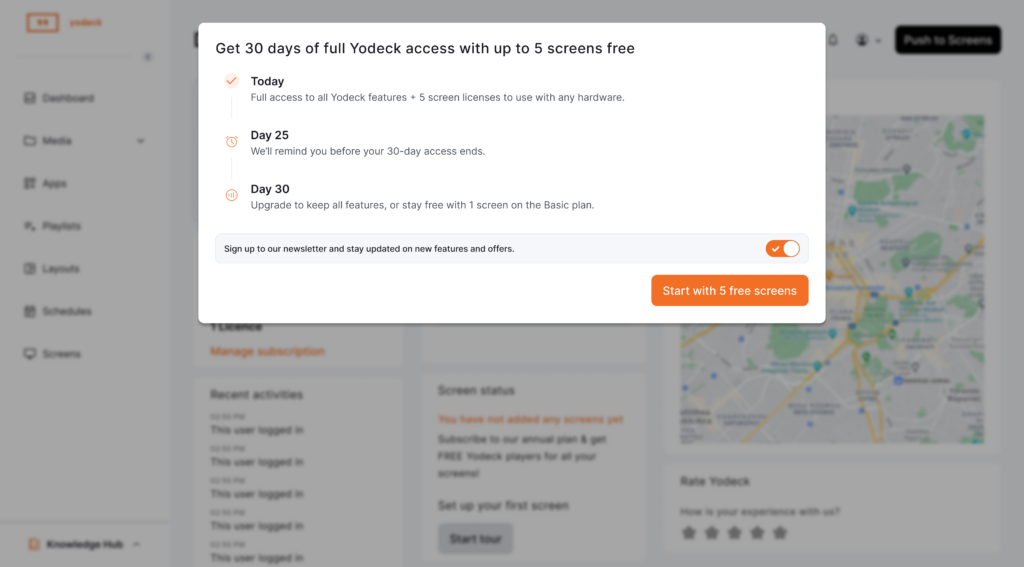
Post-signup Informative Pop-Up Window displaying the 30-day full Yodeck platform's access period with availability of up to five screens.
1) Post-signup Informative Pop-Up Window

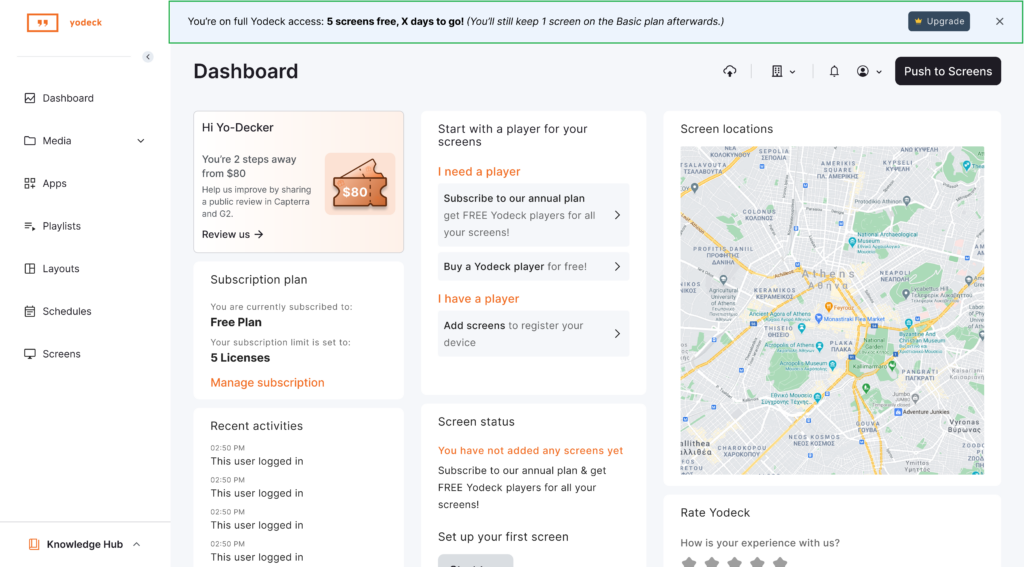
ℹ️Unlimited Access Period Status Banner on the Dashboard

A banner at the top of the platform’s dashboard shows:

  • You’re on full access.
  • Your Unlimited Access Period screen allowance.
  • How many days do you have left?
Post-signup Informative banner displaying inside the Yodeck platform the remaining number of screens and days available of the Unlimited Access Period.
2) Unlimited Access Period Status Banner on the Dashboard

💡All Unlimited Access Period limits are enforced automatically, so you don’t need to worry about misconfiguring anything.

2️⃣Day 25: You get a notification reminder

You will receive an email notification on the 25th day of the Unlimited Access Period, and you will also see an in-app reminder so you’re not surprised by the end date.

Before your Unlimited Access Period ends

If you plan to keep using Yodeck after the Unlimited Access Period, we recommend taking the following actions before the Unlimited Access Period’s end date:

  • Connect the screens you plan to use long-term.
  • Test real schedules, layouts, and content.
  • Confirm the player hardware you’re happy with.
  • Upgrade before the Unlimited Access Period ends to keep your content and full setup.

💡Completing these steps ensures your setup continues exactly as tested, without interruptions or data loss.

3️⃣Day 30: The Unlimited Access Period ends

If you have not upgraded before the Unlimited Access Period’s end, you will see on the platform a clear choice in the form of a pop-up window on the day the 30-day Unlimited Access Period ends:

Specifically, you’ll see the following two options:

  • Upgrade to one of our paid plans to keep the features, apps, and number of screens, or
  • Downgrade by continuing with the Free Plan (with 1 free screen), and have access to the basic features and apps.

If you choose not to upgrade at the Unlimited Access Period’s end:

  • Your account is automatically moved to the Free Plan, with one (1) free screen and the Basic plan’s features and apps available.
  • Content created during the Unlimited Access Period is retained as long as it is not based on or is part of the features and apps.
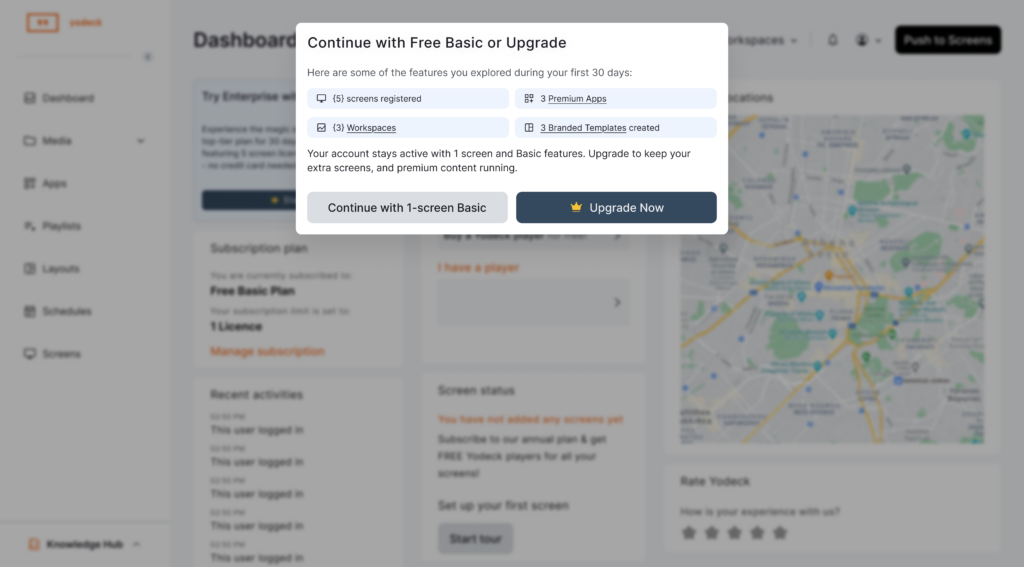
Unlimited Access Period Informative pop-up window displaying the available options to users after the end of the Free Period. The options are to either downgrade or upgrade.
3) End of Unlimited Access Period Decision Pop-up Window

💡Upgrading before the Unlimited Access Period ends ensures there’s no interruption and nothing is lost.

Full list of Features Per Plan

For a full list of all the paid plans (Basic Paid, Premium, and Enterprise) and their respective features, please click the button below:

List of Features per Plan

What happens after the Unlimited Access Period ends

After the Unlimited Access Period ends, what happens next depends on whether you choose to upgrade to a paid plan or continue on the Free Plan with basic features.

If you Upgrade:

  • Your account continues uninterrupted as it is upgraded to the selected paid plan.
  • The screens you tested during the Unlimited Access Period may remain active based on the number of screens you choose when upgrading to your selected plan.
    • For example, if you choose six screens for the selected paid plan, all Unlimited Access Period screens will remain available to you. However, if you select four screens, one Free Period screen (having the highest screen ID number) will be disabled.
  • All apps from the Unlimited Access Period that are also included in your plan stay enabled. Otherwise, some might get disabled, depending on the selected plan.
  • All features from the Unlimited Access Period that are also included in your plan stay enabled. Otherwise, some might get disabled, depending on the selected plan.
  • All content you created during the Unlimited Access Period is preserved.

💡Upgrading can turn your Unlimited Access Period setup into your production setup, with no resets or reconfiguration required, depending on your plan and screen selection.

If you do Not Upgrade:

  • Your account is downgraded and continues on the Free Plan with basic features while remaining active.
  • Only one (1) free screen remains active, while the four (4) remaining screens are disabled (they stop playing content). The first initialized screen (meaning the one with the smaller ID number) is the one screen that remains active, by default. However, you can disable the first (default) screen and enable one of the other screens. Only one screen may remain active at any given time.
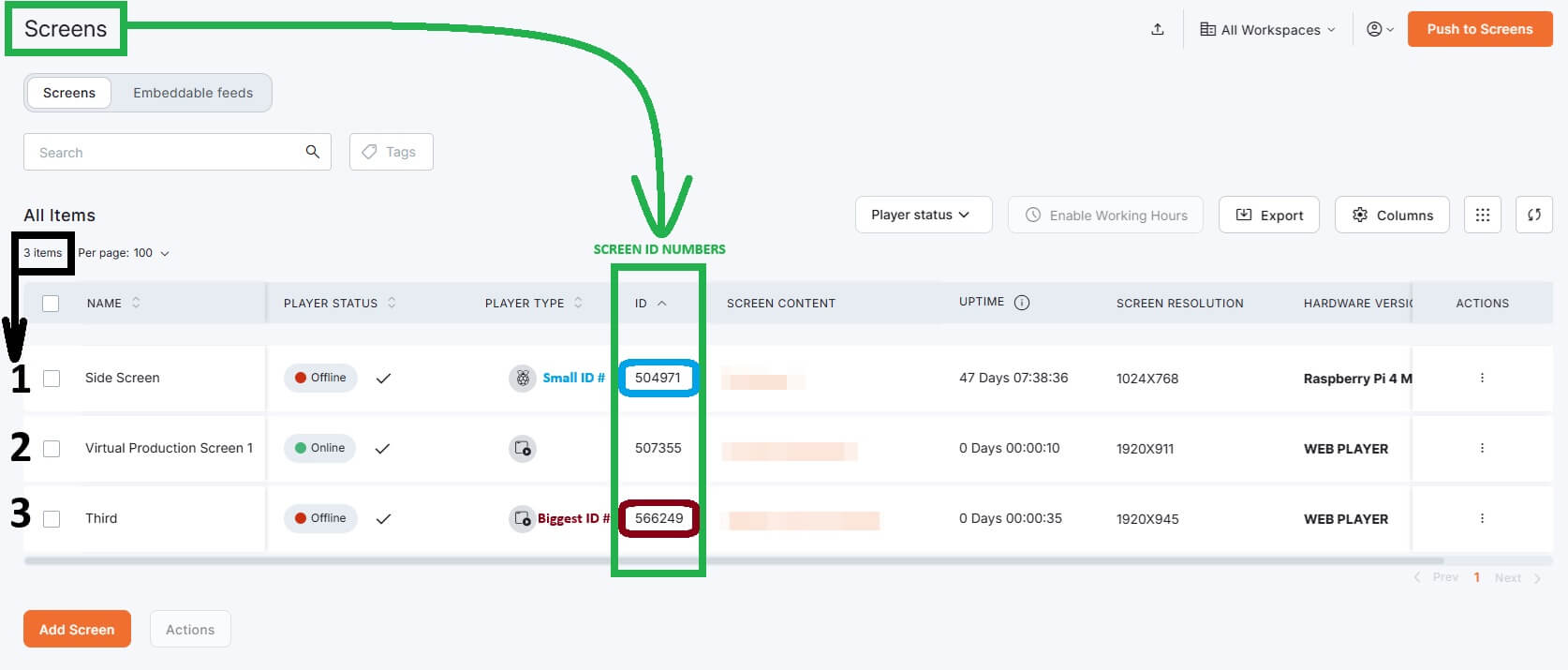
    Screens page in Yodeck displaying the Screen ID numbers as an example of how each screen ID number is handled after the Free Period ends in relation to which screen remains active and which ones do not.
  • Only Free Plan apps are available. Premium/Enterprise apps are disabled.
  • Only Free Plan features are available. Premium/Enterprise features are disabled.
  • Content created during the 30-day Unlimited Access Period is retained as long as it is not part of or belongs to any Premium/Enterprise features and apps.

💡If you want to keep your content and your full setup intact, you’ll need to upgrade before or during the Unlimited Access Period’s end.


Real-World Examples

The examples below (click to reveal!) showcase how different customers typically use the Unlimited Access Period in real situations. You may recognize your own use case and better understand what happens during and after the Free Period, depending on how you use or wish to use Yodeck.


Example 1: A small business testing two screens

Maria runs a café and wants digital menus.

  • She signs up, and the Unlimited Access Period starts automatically.
  • She connects 2 screens using Android players she already owns.
  • She tests schedules (breakfast vs lunch menus) and updates content daily.

After 30 days:

  • She upgrades to keep both screens running.
  • Nothing changes. Her setup and content continue without interruption.

Example 2: An IT manager comparing hardware (Raspberry Pi vs Android)

Alex manages screens for a retail chain.

  • He signs up and connects 5 screens.
  • He tests 3 Raspberry Pi setups and 2 Android devices.
  • He compares stability, setup time, and daily operations.

After 30 days:

  • He upgrades and keeps the best-performing setup as his production standard.

Example 3: First-time user not ready to upgrade

Nick signs up to explore, but decides not to upgrade.

  • During the Unlimited Access Period, he uses 3 screens.
  • He creates playlists, schedules, and layouts.

After 30 days:

  • His account continues on the Free Plan with basic features (1 screen).
  • 1 of the 3 screens stays active. This one active remaining screen is the first initially initialized screen having the smaller screen ID number.
  • The other 2 screens are disabled. These two disabled screens follow the first initialized screen and have larger screen ID numbers.
  • His content is retained as long as it is not part of or included in any Premium/Enterprise features or apps.


F.A.Q.s

Got questions? We’ve got answers! This section addresses common questions about the Yodeck Unlimited Access Period.

What’s the best way to use the Unlimited Access Period if I’m evaluating Yodeck seriously?

Set up the screens you actually plan to use, publish real content, and test real schedules. Treat the Unlimited Access Period like a live environment.

Is the Unlimited Access Period intended only for demos?

No. The Unlimited Access Period is designed for real-world testing, not just demos.

Can I add or remove screens during the Unlimited Access Period?

Yes. You can register and manage screens freely, as long as the total stays within the 5-screen Unlimited Access Period limit.

Can multiple people work on the same account?

Yes. You can invite users and manage access so your team can test together.

Can I use the Unlimited Access Period for a proof of concept?

Yes. Many teams use the Unlimited Access Period to build a working proof of concept before making a purchase decision.

Can I pause or extend the Unlimited Access Period?

The Unlimited Access Period runs continuously for 30 calendar days. If you need more time, contact the Yodeck team.

Does Unlimited Access Period usage affect pricing later?

No. Unlimited Access Period usage does not impact pricing.

Is support available during the Unlimited Access Period?

Yes. Unlimited Access Period users have access to Yodeck’s support resources and documentation.

Can I migrate content from another platform during the Unlimited Access Period?

Yes. Many users do this as part of their evaluation.

Where can I find your plans and pricing details?

You can view our plans and pricing from your dashboard and on the Yodeck website.


Need Help?

The Yodeck Support Team can help you out! Log in to your Yodeck account and send us a message from the bottom right corner!

In this article

Previous Workspaces Introduction Next Account settings
Yodeck
HomepageGeneralWhat is Digital SignageFree Signage SoftwareRaspberry Pi SignageProductFeaturesAppsFree Signage TemplatesSolutionsSupportContactSupport CenterGive FeedbackFAQ
LinkedIn X Facebook Instagram YouTube Pinterest